
J-Tech Digital
Model: JTECH-W6
JTD-ID 522
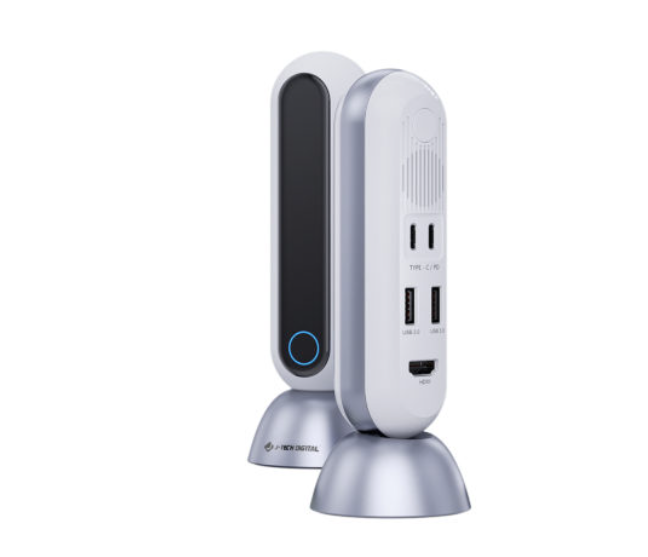
Overview:
The JTECH-W6 is a USB-C + HDMI wireless extender that transmits a 4K@30Hz/1080p@120Hz up to a distance of 80 feet with zero delay. This is all done with a clear line of sight over a 60GHz mm wave wireless band, which means it avoids the 5GHz signal entirely; perfect for laptops and desktops during conference room presentations. This unit has a USB hub for fast charging, so devices like smart phones and tablets can be connected to the two USB-A ports. In addition to zero latency video signal, high-definition audio is also supported, including Dolby Digital, Dolby TrueHD, DTS-HD Master Audio and LPCM at a speaker capacity of up to 7.1CH. As with all of our products, free lifetime support is offered through our customer support team.
The Setup:
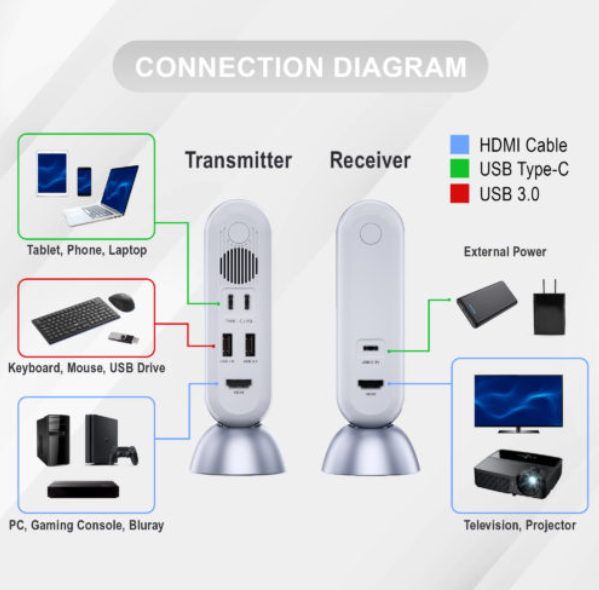
- Connect your source to the transmitter's input ports.
- USB-C for things like drives, keyboard and mouse.
- HDMI for things like PCs, consoles and media players.
- Connect your display to the receiver unit.
- Use the receiver's USB-C port to provide 5V/1A power to the receiver.
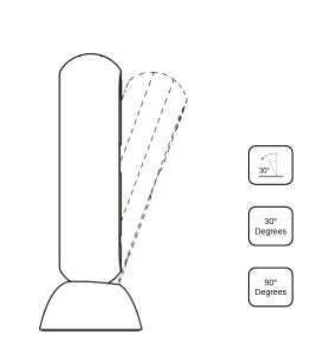
- Adjust the angles of the units as necessary to enhance signal strength
Troubleshooting:
Status of LED Indicators:
- Light Off: The device is not powered on.
- Light Flashes Slowly: The transmitter and receiver are not paired.
- Light Flashes Quickly: The transmitter and receiver have paired successfully.
- Light On: Successfully connected and currently working.
If You Are Unable to See Video or Hear Audio:
- Power cycle both units for about 10 seconds.
- Check the quality and performance of utilized HDMI cables.
- If a PC is connected, also ensure any updates to the PC and its graphics drivers have been done.
- Adjust the angle of the unit's towers to adjust signal directionality.
- Ensure that the units are properly powered on.
- If units refuse to power on, you may need to replace the unit in its entirety.
If Signal Strength or Quality are Inconsistent:
- Try power cycling both units for about 10 seconds.
- Adjust the angle of the unit's towers to adjust signal directionality
- 30° for longest distance.
- 90° for maximum strength.
- Press and hold the reset button on the unit for 7 - 10 seconds.
- Test alternative input devices for USB-C and HDMI to confirm if the issue is consistent.
- If the issue is consistent, the problem may be with the unit and may require replacement.
- If the issue is not consistent, consider adjusting the resolution and refresh rate for any inconsistent connections. 4K@30Hz and 1080p@60Hz-120Hz are excellent for testing and confirming.
J-Tech Digital Support Team
1-866-610-2818
support@jtechdigital.com
Comments
0 comments
Please sign in to leave a comment.