
J-Tech Digital
Model: JTECH-SMX44
JTD-ID: 795
Overview:
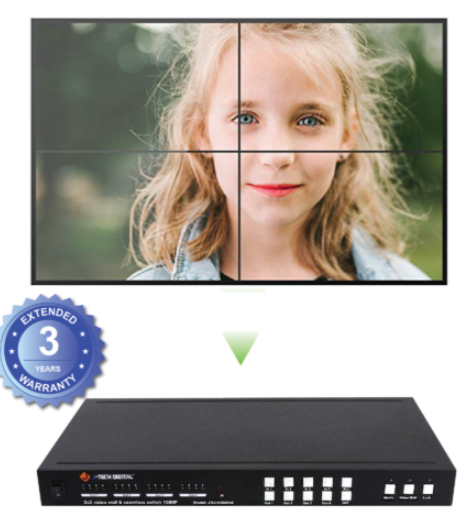
The JTECH-SMX44 is a 1080p seamless video wall controller that allows any 1 of 4 sources to output to 2 or 4 displays simultaneously in a 2x2 video wall mode. Supported resolutions include 1080p/1080i/720p/576p/576i/480p/480i at 60Hz. The unit supports remote switching and control via RS232. The SMX44 has free, lifetime support through J-Tech Digital.
Application:
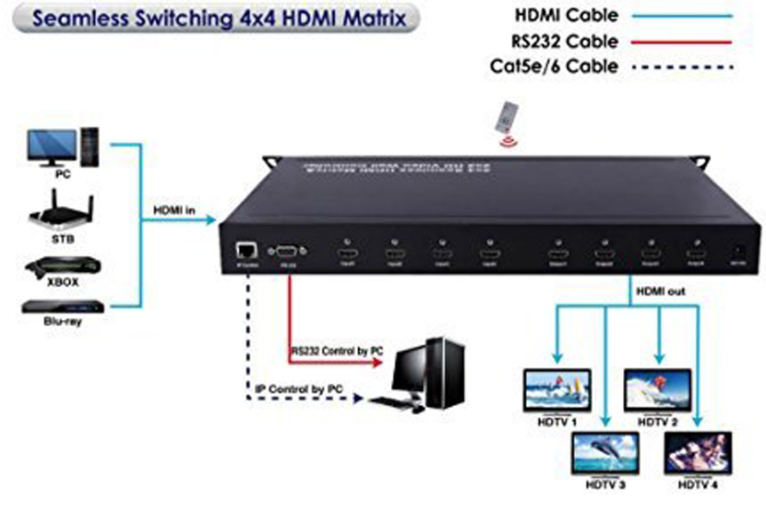
- Connect up to 4 input sources to up to 4 outputs in any combination, with a maximum bandwidth of 1080p 60Hz.
- Control the unit through RS342 or the Ethernet port with a PC.
Setup:
- Prior to powering on, connect all HDMI cables from their necessary source devices to HDMI IN 1 - 4.
- Connect the outputs, starting from the upper left of the video wall first, to the lower right of the video wall last.
- Connect any RS232 or Ethernet peripherals as necessary.
- Power on the device and use as intended.
Troubleshooting:
- Power
- If the device is not receiving any power, be sure to try a different outlet or surge protector. If there is still none, contact support, as the power adapter or unit may require replacement.
- Video
- If one or more sources are not providing video, while others still appear to function as intended, confirm the functionality of the cable going into the HDMI IN from that device.
- If one or more outputs are not providing video, while others still appear to function as intended, confirm the functionality of the cable going into the HDMI IN of that display.
- If no inputs are showing up on any of the outputs, confirm that all displays are showing the correct input (I.E. Input - HDMI 1, 2, 3, 4). Confirm whether or not the unit is receiving power. If there is no power, refer to troubleshooting step 1. If there is power, the unit may require replacement.
- If video is being displayed, but they are jumbled or are in an incorrect order, readjust the output HDMI cables located on the back of the unit until the picture is coherent.
- Audio
- If no audio is being provided to one or more displays while others work, confirm the functionality of the associated, non-working audio display's HDMI cable.
Comments
0 comments
Please sign in to leave a comment.