
J-Tech Digital
Model: JTECH - BDE02
JTD-ID 537

Overview:
The JTECH-BDE02 is a Bi-directional universal audio converter and Dolby Digital decoder supports both analog to digital audio signal conversion (ADC) and digital to analog audio signal conversion (DAC). Fully licensed Dolby decoder automatically downmixes a multichannel digital audio signal for compatibility with any stereo playback system, analog or digital. This unit simultaneously converts an analog L/R stereo, digital optical SPDIF TosLink or digital coaxial audio input into three audio outputs with electronic noise-free transmission. This unit is easy to use and set up, just use the input select switch to choose between optical, coaxial or L/R inputs. LPCM input sampling rates 32 to 96 kHz, output 48kHz. This device includes a One-Year Manufacturer Warranty and free lifetime technical support from our US based Customer Support Team.
Application:
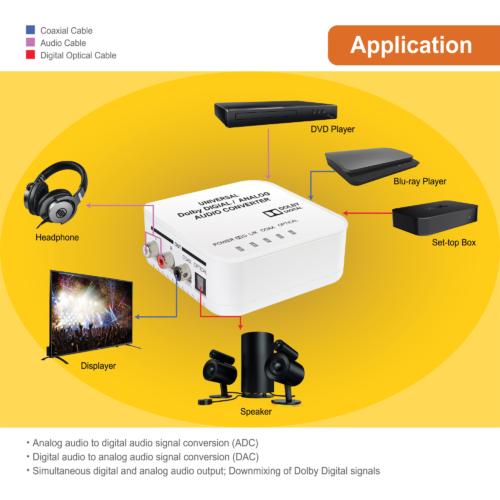
- Connect multiple sources (DVD player, Cable Box, Blu-Ray player) to convert analog audio to digital.
- Or vise-versa, convert digital audio signals to analog signal.
- Downmix multichannel Dolby Digital audio signals.
- Simultaneous digital and analog audio outputs.
Setup:
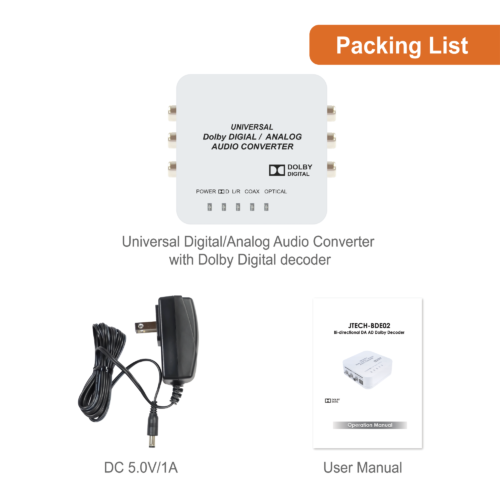
- Connect the 5 V/1 A DC power supply to the unit and plug the
adaptor to an AC wall outlet. - Push the "POWER" button to turn the unit on or off.
- Select the current audio source, either optical, coaxial or L/R
(Analog) using the "Input Select" switch.
Troubleshooting:
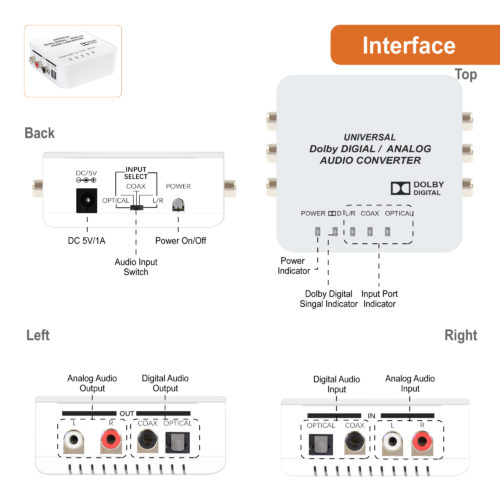
- Use the LED status light indicators to see if you are getting signal and power to the unit:
1.) "Power Indicator" will tell you whether unit is getting power
2.) " Dolby Logo" Will indicate if the unit is getting a Dolby 5.1 channel signal.
3.) "L/R" "COAX" "OPTICAL" will all indicate if the unit is getting signal from it's respective input. - Use the audio settings within your source device to make sure you are outputting compatible audio formats.
- Make sure all cables are compatible and capable of translating useable audio formats.
Audio Formats:
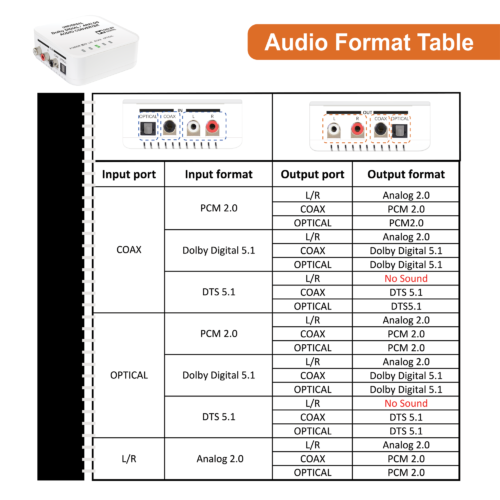
Use this audio format table to see which audio formats will be compatible with this unit. With certain formats, you may not be able to output Analog 2 channel audio so it is essential to understand what you are inputting from the source and how it is converted within the unit.
J-Tech Digital Support Team
1-888-610-2818
support@jtechdigital.com
Comments
0 comments
Please sign in to leave a comment.