
J-Tech Digital
Model: JTECH-SW0301
JTD-ID 109

Overview:
The JTD-SW0301 is a 3x1 audio switch that allows for multiple sources that use optical cables to be output to a single of SPDIF/TosLink receiving device. It supports various audio formats, including Dolby Digital & DTS 5.1 and Support PCM Stereo at 32kHz, 44.1kHz, 48kHz and 96kHz. The device is plug & play and transmits sound right out of the box. The device supports 5.1 channels output at a distance of up to 130 ft. The desired inputs can be chosen via remote control or the on-unit button labeled "Switcher". This unit's over-voltage protection can prevent damage to the unit that would normally be caused by connecting an unmatched power adapter. Of course, this device comes with J-TECH's free, lifetime support.
Application:
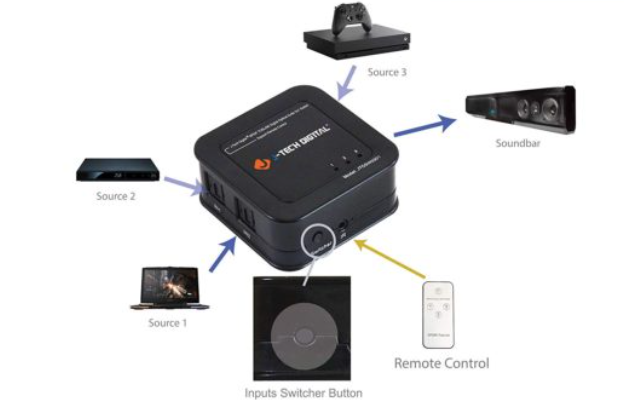
- With multiple optical sources (Console, Blu-Ray Player, PC, Etc.), output to a single SPDIF/TosLink receiving device (Sound Bar, Audio Receiver, Etc.).
- Choose the active source, either with the remote control or with the "Switcher" button on the unit.
Setup:
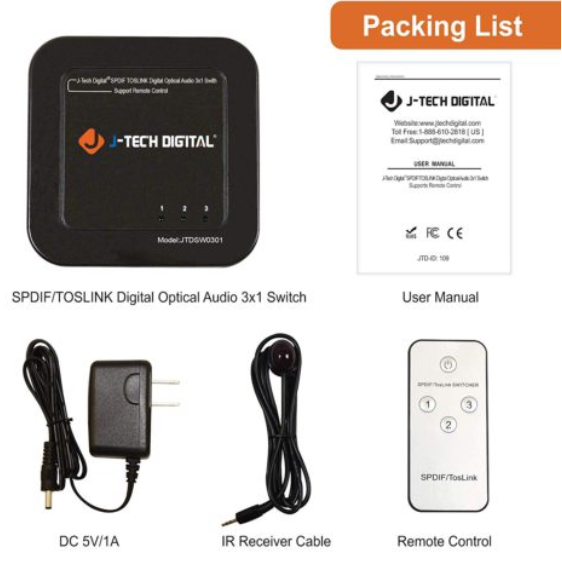
- Remove isolation plastic from the remote control unit before first time use.
- Place the JTD-SW0301 somewhere convenient.
- Plug in input cables from sources to ports labeled "IN 1", "IN 2", and "IN 3".
- Plug in output cable to port labeled "OUT" to SPDIF/TosLink receiving unit.
- Plug in the IR Receiver Cable for remote use.
- Plug in the DC 5V/1A adapter.
- Enjoy quality sound.
Troubleshooting:
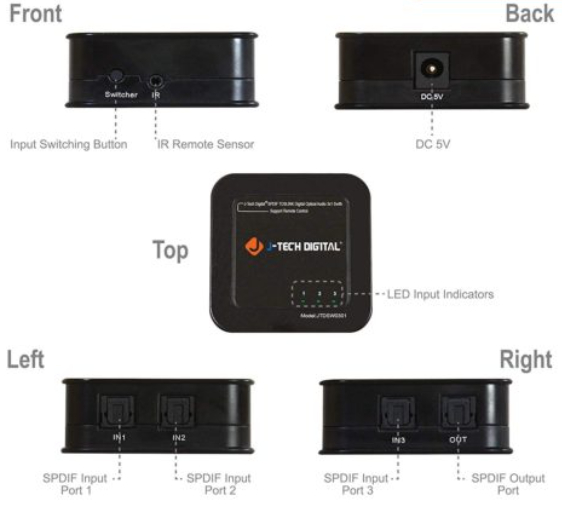
- The LED Input Indicators will illuminate to determine that a source is detected to the corresponding ports.
- If there are a combination of illuminated and non-illuminated indicators, check the attached cables from your sources.
- If the cables have been tested, but some ports simply do not illuminate when switched to, you may need a replacement unit.
- If there are no lights illuminated, you may need to power cycle the unit, plug the adapter into a new outlet or may require an adapter replacement.
- If there are a combination of illuminated and non-illuminated indicators, check the attached cables from your sources.
- The remote can be used to remotely switch the inputs on the unit.
- If the unit does not switch via the remote, you may need a replacement IR cable.
- If the IR Receiver cable has been replaced and you are still unable to remotely switch, you may need to look into a replacement remote or unit.
- If the unit does not switch via the remote, you may need a replacement IR cable.
- If no audio can be heard, check the source's audio format to ensure that it is sending either Stereo or Dolby Digital 5.1. Dolby Digital Plus will not be recognized by the unit.
Comments
0 comments
Please sign in to leave a comment.