
J-Tech Digital
JTECH-JTDAT5CH
JTD-ID 80

Before setting up, make sure you have the following:
- Provided 5VDC Power Adapter
- (2) HDMI Cables (ver. 1.4 or later)
- Analog RCA Cable or Optical SPDIF Cable (based on your setup)
Overview:
This unit extracts the digital audio signal from the HDMI input and converts it to 2 channel analog stereo output or 5.1 channel Audio outputs.
Application:
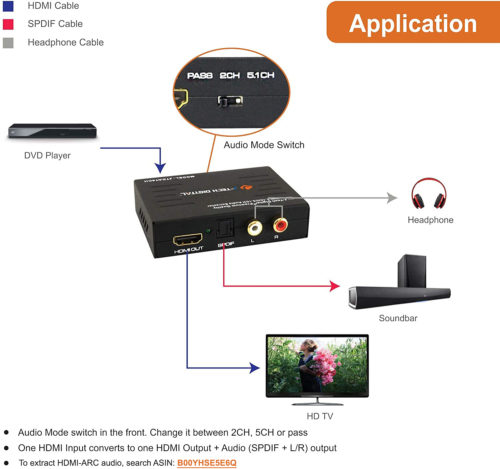
-
HDMI Input - 1080p @ 60hz
-
HDMI Output – 1080p @ 60hz
-
SPDIF Output – Toslink/Optical
-
2 CH Output– RCA
-
Pass Through – HDMI Output Only
- DC 5V/1A Power Supply
Connecting:
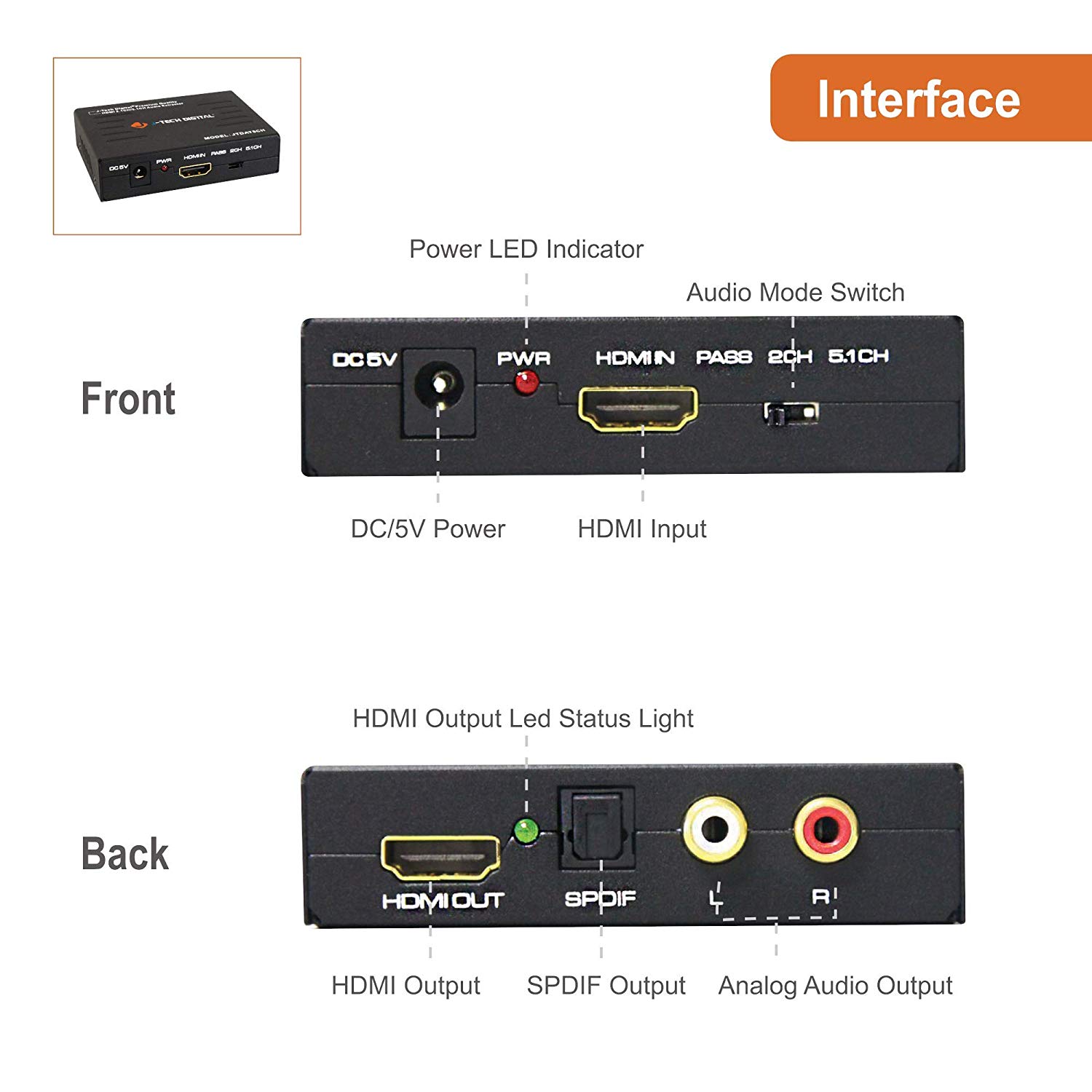
-
Using an HDMI cable, connect the source device to the HDMI input port of the audio extractor.
-
Using the 2nd HDMI cable, connect the HDMI output of the extractor to your display’s HDMI input port.
-
Make sure to place the audio switch to the correct EDID setting (Pass, 2CH, 5.1 CH)
-
Pass copies the EDID information of your display
-
-
Using the audio cable (Toslink or RCA), connect the audio output of the audio extractor to your devices audio input.
-
Using our power supply, make sure to plug in the audio extractor.
-
Power on source device. Check to make sure the resolution/refresh rate matches our specifications.
-
Power on display. Check to make sure the resolution/refresh rate matches our specifications.
*Note: Simultaneous audio from L/R Out, Optical Out and HDMI can only be achieved if the source audio signal is set to PCM / Stereo
**Note: This unit does not support ARC function, and will not extract audio if using TV as a source
Troubleshooting:

No Picture:
- Ensure your source device is outputting compatible resolution and that your display will accept incoming resolution from the unit
- Check quality and grade of HDMI cable.
No Sound:
- Ensure audio mode switch settings are in appropriate position.
- Check source audio settings and ensure sources are set to a format that is supported by audio extender.(PCM 2.0 CH,DTS, Dolby Digital, etc.)
- Audio from two channel RCA jack will not be available when unit is in 5.1 mode.
- Ensure quality of audio cables are good.
J-Tech Digital Support Team
support@jtechdigital.com
1-888-610-2818
Comments
0 comments
Please sign in to leave a comment.