
How To Guide: JTDSP0103 Optical Audio Splitter Setup
The JTDSP0103 / JTD-42 1-Input, 3-Output Optical Audio Splitter allows users to send their optical spdif/toslink audio signal to three separate destinations simultaneously. Incorporate your new soundbar, AV receiver or wireless headphones into your existing setup easily with the JTDSP0103.

Connection Diagram
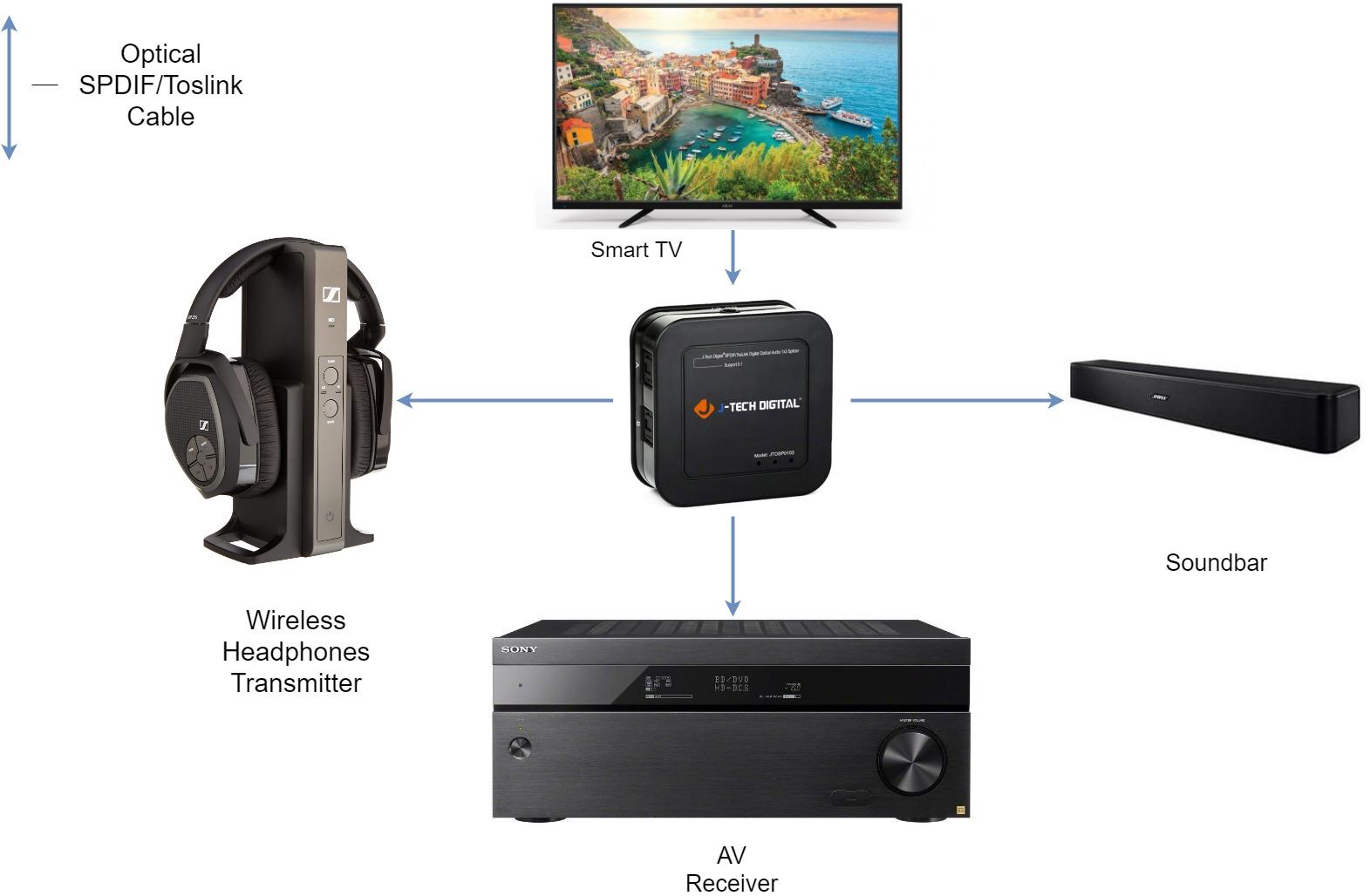
What You'll Need:
- 1 x J-Tech Digital JTDSP0103
- 4 x Optical Audio SPDIF/Toslink Cables
Setup Instructions:
- Connect an optical audio cable to the Digital Audio Output port of your source device and to the "In" port of the JTDSP0103 (In the connection diagram above, the Smart TV is the source device)
- Connect an optical audio cable to Output Port "A" on the JTDSP0103 and to the Digital Audio Input port of your audio device (Wireless Headphones Transmitter/AV Receiver/Soundbar)
- Repeat step 2 and utilize Output Port "B"& "C" on the JTDSP0103 for connecting additional audio devices
Comments
0 comments
Please sign in to leave a comment.