
J-Tech Digital
Model: JTECH-MV41V
JTD-ID: 440
Overview:
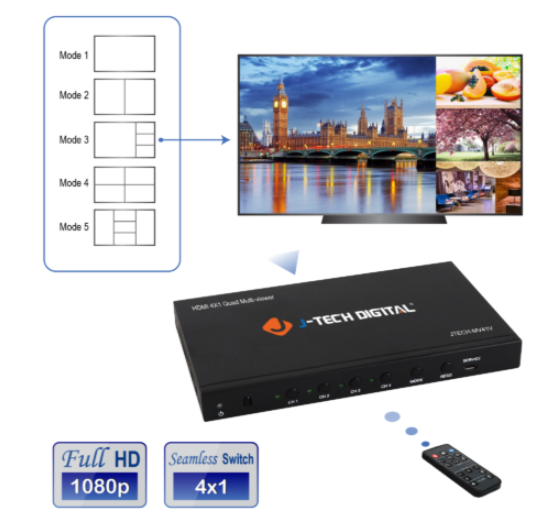
The JTECH-MV41V is a 1080p quad multi-viewer. It supports 4x HDMI inputs, 1x HDMI output, 1x VGA Output and 1x 3.5mm Audio Output. This unit allows for switching between 4 sources and seamless transitions between them. The HDMI and VGA can be used simultaneously, with zero latency between both. Experience up to a maximum of 1080p 60Hz content. There are 5 supported display modes, including displaying up to all sources at the same time on a single display. These can be custom rearranged to display in every quadrant. As all devices, this unit has free, lifetime support through J-Tech.
Application:
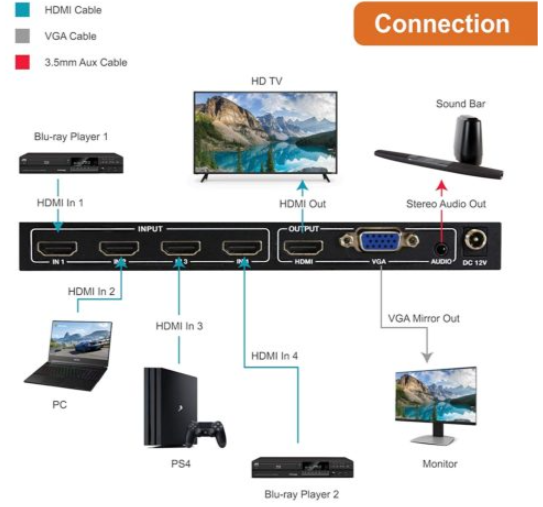
- Input up to 4 HDMI sources, with a maximum resolution of 1080p 60Hz.
- Output to a single HDMI or VGA display.
- Output to an audio system with 3.5mm stereo output.
- View multiple sources on up to two displays with HDMI or VGA out; zero latency.
- Remote control and adjustment of the output video modes.
Setup:
- Prior to powering on the unit, plug HDMI input from each source into an HDMI IN port.
- Plug a cable from the HDMI OUT to the intended output display. Repeat for VGA.
- Plug 3.5mm stereo cable from AUDIO port to stereo system.
- Power on the device and enjoy video output content.
Troubleshooting:
- Power
- If the device is not receiving any power, be sure to try a different outlet or surge protector. If there is still none, contact support, as the power adapter or unit may require replacement.
- Video
- If any single HDMI input is not displaying, while others are, check the HDMI cable of the unit in question. If the HDMI cable is confirmed to function, try a different source. The issue may be with the input device's HDMI OUT, the JTECH unit's HDMI IN port or an HDCP communication between the two.
- If no outputs are displaying via HDMI or VGA, check the associated cables. If the cables are confirmed to function, contact support. The issue may be with the J-TECH unit's HDMI or VGA OUT ports.
- Audio
- If no audio is present through a sound system, check the 3.5mm cable. If it is confirmed working, try confirm your audio formats from your source devices and ensure that they are in 2CH stereo.
- If no audio is present on the HDMI out display, confirm the functionality of the HDMI cable in use. If the HDMI cable is functioning, then the issue may be with the JTECH unit's HDMI OUT port. Contact support for replacement of the unit.
Comments
0 comments
Please sign in to leave a comment.